All Microsoft Fabric tools – a complete guide to the Microsoft Fabric ecosystem
Does your organization use multiple data sources at the same time, such as ERP systems, Excel, marketing platforms, or cloud solutions? In many companies, the challenge is no longer access to data itself, but rather its integration, analysis, and extracting business insights quickly. That is exactly why Microsoft created Microsoft Fabric.
Microsoft Fabric is a comprehensive analytics environment that brings together tools for data integration, data engineering, reporting, real-time analytics, and Business Intelligence in one place. The platform is designed to simplify the work of data teams and eliminate the need for multiple separate systems.
In practice, this means that all MS Fabric tools operate within a single ecosystem. As a result, organizations can:
- centralize data from multiple sources,
- automate analytical processes,
- create modern Power BI reports,
- manage data warehouses,
- analyze data in real time,
- scale their analytics environment as the company grows.
A major advantage of the platform is its SaaS (Software as a Service) model, which allows companies to implement analytics solutions faster without expanding their own infrastructure.
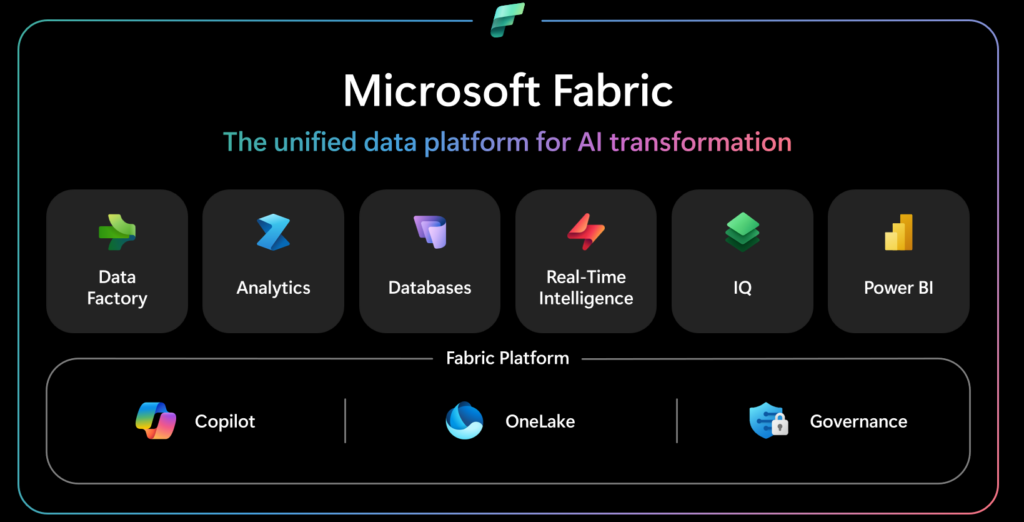
All MS Fabric tools – component overview
Microsoft Fabric is a comprehensive analytics ecosystem that integrates multiple tools responsible for data processing, analysis, and visualization. All components operate within a single environment, using a shared data layer based on OneLake. This enables organizations to eliminate data silos and reduce the need for integrating multiple separate services.
Power BI
Power BI is responsible for creating interactive reports, dashboards, and business analyses. The tool enables integration of data from multiple sources and presents it in a clear, business-friendly format.
Power BI allows you to:
- monitor KPIs in real time,
- analyze sales and financial data,
- create management reports,
- share dashboards across the organization,
- support business decision-making processes.
Data Factory
Data Factory is responsible for data integration, ingestion, and transformation. It enables building ETL and ELT processes for both on-premises and cloud environments.
Microsoft Fabric Data Factory offers:
- over 200 connectors to various data sources,
- automation of data pipelines,
- data transformations using Power Query,
- scheduling of integration processes,
- integration with ERP and CRM systems.
Data Engineering
Data Engineering enables processing of large volumes of data using Apache Spark. This component is designed for data engineers responsible for building modern analytics platforms.
Within this area, users can:
- create analytical notebooks,
- process Big Data,
- automate transformation processes,
- manage data pipelines,
- integrate with Data Factory processes.
Data Warehouse
Fabric Data Warehouse enables building modern data warehouses powered by a high-performance SQL engine.
Key capabilities:
- scalable data processing,
- separation of storage and compute layers,
- support for Delta Lake format,
- centralization of business data,
- fast execution of analytical queries.
Data Science
Fabric Data Science supports building machine learning models and predictive analytics without leaving the Microsoft Fabric environment.
The tool allows you to:
- build ML models,
- analyze historical data,
- forecast business trends,
- integrate predictions with Power BI reports,
- collaborate with Azure Machine Learning.
Real-Time Intelligence
Real-Time Intelligence enables real-time data analysis. It supports data from IoT devices, application logs, or system events.
The solution supports:
- stream data analysis,
- real-time event monitoring,
- rapid anomaly detection,
- live data visualization,
- automated responses to events.
Analytics
The Analytics layer in Microsoft Fabric is responsible for comprehensive data analysis within a single analytics environment. By integrating different workloads, organizations can cover the entire data lifecycle—from ingestion and transformation to reporting and business analysis.
Microsoft Fabric enables:
- analyzing data from multiple sources simultaneously,
- real-time data processing,
- building advanced analytical models,
- collaboration between business and technical teams,
- centralization of analytical processes.
Fabric IQ
Fabric IQ is a new component of Microsoft Fabric designed to unify business logic and data semantics across the analytics environment.
The solution supports:
- standardization of business definitions,
- centralization of metrics and KPIs,
- automation of analytical processes,
- contextual use of data,
- development of AI and machine learning solutions.
Fabric IQ leverages:
- semantic models,
- ontologies,
- Fabric Graph,
- data agents,
- operational automation mechanisms.
OneLake
The central element of the entire ecosystem is OneLake, a unified data lake for all Microsoft Fabric services.
OneLake:
- eliminates the need for data duplication,
- centralizes data management,
- enables data sharing across components,
- supports Data Lake architecture,
- allows data analysis without physically moving it between systems.
How does the Microsoft Fabric ecosystem work?
Microsoft Fabric is designed as a comprehensive analytics platform operating in a SaaS (Software as a Service) model. All tools and services function within a single environment, sharing a unified architecture and common data layer.
A single environment for working with data
In traditional analytics environments, companies often rely on multiple separate tools for data integration, warehouse development, reporting, and analysis. Microsoft Fabric solves this problem by centralizing all analytical processes.
As a result, organizations can:
- store data in one place,
- analyze data in real time,
- create reports without moving data between systems,
- manage security centrally,
- reduce infrastructure maintenance costs.
Service integration and data centralization
Microsoft Fabric enables integration of data from multiple sources:
- ERP systems,
- financial systems,
- Excel files,
- cloud applications,
- SQL databases,
- IoT sources,
- CRM platforms.
A major advantage is the zero-copy mechanism, which allows data to be analyzed without physically copying it between services.
The platform also provides:
- governance,
- access control,
- data monitoring,
- compliance and security.
Business benefits of implementing Microsoft Fabric
Implementing Microsoft Fabric allows organizations to streamline their analytics environment and accelerate data workflows. The platform supports both technical teams and business users responsible for reporting and analysis.
Faster data analysis
Thanks to the integration of all components within one platform, companies can significantly reduce the time required to prepare data for analysis.
Microsoft Fabric enables:
- automatic data ingestion,
- real-time data processing,
- faster report creation,
- continuous monitoring of business metrics,
- elimination of manual reporting processes.
Scalability and automation
Microsoft Fabric offers high scalability thanks to its cloud-based architecture built on Microsoft Azure.
The platform allows you to:
- scale resources as the organization grows,
- automate ETL and ELT processes,
- handle large volumes of data,
- integrate data from multiple sources simultaneously,
- reduce manual work for analytics teams.
Better reporting and decision-making
Thanks to integration with Power BI, organizations can:
- build interactive dashboards,
- analyze data in real time,
- monitor KPIs,
- create management reports,
- share analytics across the organization.
A consistent data environment helps eliminate discrepancies between reports created by different departments.
Which companies is Microsoft Fabric a good fit for?
Microsoft Fabric is designed for organizations that want to centralize data, automate analytics processes, and build a modern Business Intelligence ecosystem.
Organizations working with multiple data sources
In many companies, data is stored across different systems and locations:
- ERP,
- CRM,
- Excel,
- SQL,
- e-commerce platforms,
- financial systems,
- cloud applications.
Lack of centralization often leads to:
- inconsistent reports,
- data quality issues,
- manual analysis preparation,
- longer reporting times.
Microsoft Fabric enables combining all data sources in a single environment based on OneLake.
Companies developing modern BI and AI
Microsoft Fabric supports:
- advanced analytics,
- machine learning,
- predictive analysis,
- process automation,
- real-time data analysis,
- Data Science environments.
This solution works particularly well in industries such as:
- finance,
- retail,
- manufacturing,
- logistics,
- e-commerce,
- professional services.
Summary
Microsoft Fabric is a modern analytics platform that integrates all key areas of working with data into a single environment. By combining services such as Power BI, Data Factory, Data Engineering, Analytics, Fabric IQ, and Data Warehouse, organizations can analyze data faster and build a consistent Business Intelligence ecosystem.
How to get started with the platform
Implementation of Microsoft Fabric should begin with an analysis of the current data environment and business needs.
It is crucial to define:
- data sources,
- reporting processes,
- analytical requirements,
- areas requiring automation,
- AI and Business Intelligence needs.
A good practice is to start with a pilot implementation covering a selected business area, such as sales reporting or financial analysis.
Want to see how Microsoft Fabric can improve data analytics in your company? Contact the EBIS team and learn how to build a modern Business Intelligence environment based on Microsoft technologies.